V2EX = way to explore
V2EX 是一个关于分享和探索的地方
Sign Up Now
For Existing Member  Sign In
• 请不要在回答技术问题时复制粘贴 AI 生成的内容
formulahendry
V2EX  ›  程序员

Code Runner for VS Code, 支持运行 27 种语言 (C, C++, Java , JS, PHP , Python , Perl, Ruby, Go, Lua, Groovy, PowerShell...)

  •  8
     
  •   formulahendry ·
    formulahendry · Jan 14, 2017 · 18136 views
    This topic created in 3394 days ago, the information mentioned may be changed or developed.

    经过了半年的打磨,Code Runner已经支持了 27 种语言: C, C++, Java, JS, PHP, Python, Perl, Ruby, Go, Lua, Groovy, PowerShell, BAT/CMD, BASH/SH, F#, C#, VBScript, TypeScript, CoffeeScript, Scala, Swift, Julia, Crystal, OCaml, R, AppleScript, Elixir 。并且支持以下几个主要功能:

    • Run code file of current active Text Editor
    • Run selected code snippet in Text Editor
    • Run custom command with customized parameters
    • Stop code running
    • View output in Output Window
    • Set default language to run
    • Select language to run
    • Support REPL by running code in Integrated Terminal
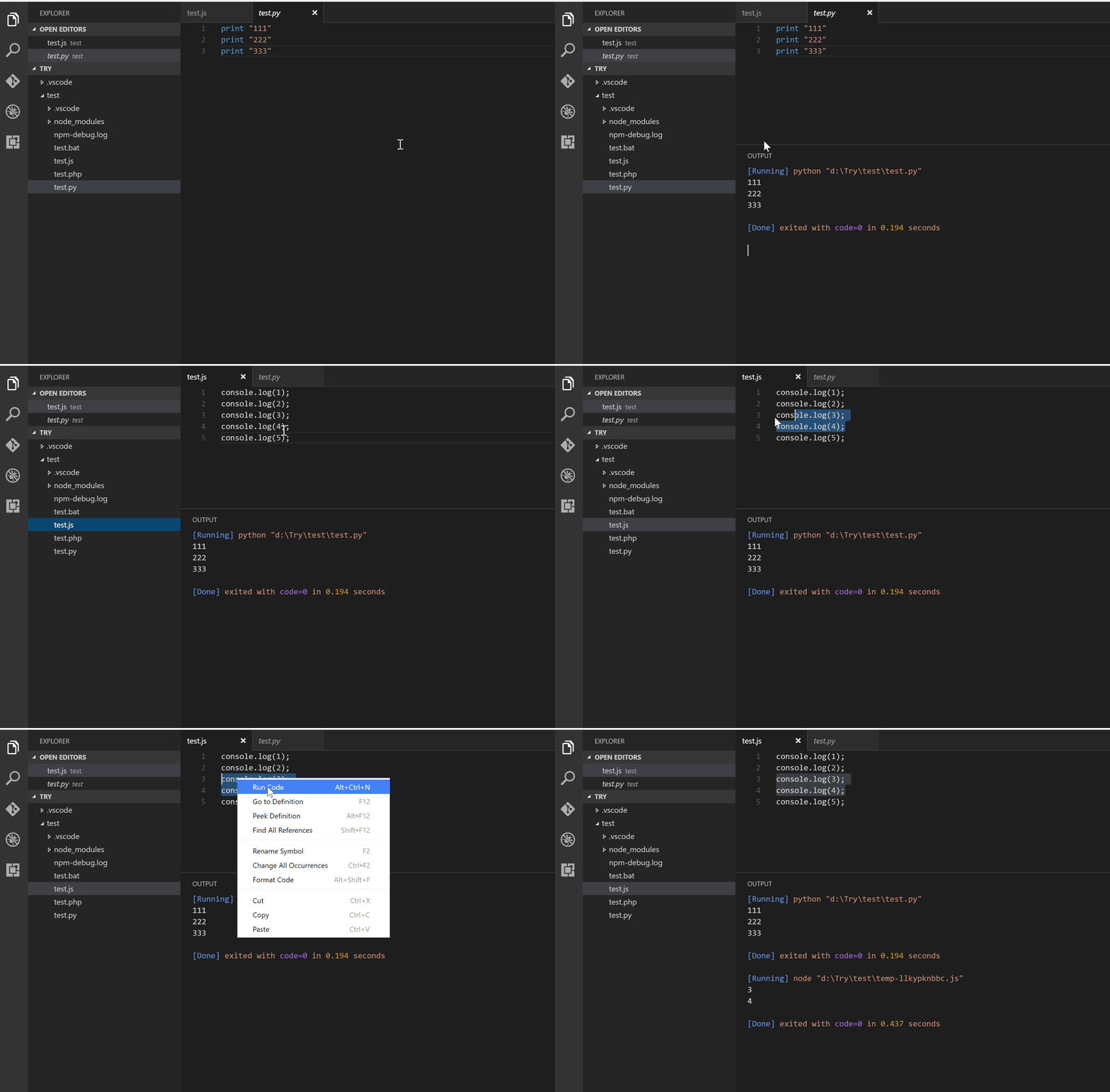
    run code

    如果大家发现了任何 bug 或者有什么建议,欢迎来GitHub给我提 issue 或者 PR 。

    Supplement 1  ·  Jan 3, 2019

    最近还开通了"玩转VS Code"的公众号。希望能和大家分享一下VS Code使用和开发的一些经验,主要希望提供的内容包括但不限于:

    • VS Code 快速入门
    • VS Code 使用技巧
    • VS Code 插件推荐
    • VS Code 插件开发

    有兴趣的童鞋,可以来关注"玩转VS Code"公众号。也希望听听大家的意见,更希望看到什么样的内容。 QR

    59 replies    2018-03-11 17:21:12 +08:00
    langmoe
        1
    langmoe  
       Jan 14, 2017
    我还以为买的 Code Runner 又有更新了。。
    chairchan
        2
    chairchan  
       Jan 14, 2017 via Android
    兹词 正在用😀
    KiriGiri
        3
    KiriGiri  
       Jan 14, 2017 via Android
    可以添加一个功能,把运行结果直接替换选中的代码,就像 vim 的:'<,'>!command 。
    asxaqz
        4
    asxaqz  
       Jan 14, 2017
    一直在用。支持。
    0915240
        5
    0915240  
       Jan 14, 2017
    我曹 !
    兹词~~
    40huo
        6
    40huo  
       Jan 14, 2017
    兹词,好用!
    cdwyd
        7
    cdwyd  
       Jan 14, 2017
    python 的输出不是实时的吗?测试了下是全部执行完才统一输出
    quericy
        8
    quericy  
       Jan 14, 2017
    厉害了,已安装
    exoticknight
        9
    exoticknight  
       Jan 14, 2017
    好厉害,是不是应该换了……
    kchum
        10
    kchum  
       Jan 14, 2017
    我也以为是 Code Runner 2 。。
    loading
        11
    loading  
       Jan 14, 2017 via Android
    比 vs go 是不是强一些呢,看看。
    pipecat
        12
    pipecat  
       Jan 14, 2017 via iPhone
    在用,支持
    formulahendry
        13
    formulahendry  
    OP
       Jan 14, 2017
    @langmoe @kchum 我们这个 Code Runner 可是免费跨平台的哦😁
    formulahendry
        14
    formulahendry  
    OP
       Jan 14, 2017
    @KiriGiri VIM 没怎么用过,能具体说下吗?比如说,运行 var a = 1 + 2 ,然后把代码替换为 var a = 3?
    blanu
        15
    blanu  
       Jan 14, 2017 via iPhone
    Great! VSCode 自带的调试运行时太重,这个看上去就非常方便
    formulahendry
        16
    formulahendry  
    OP
       Jan 14, 2017
    @blanu 对滴!而且能选择运行 code snippet ,快捷轻巧😎
    XYxe
        17
    XYxe  
       Jan 14, 2017
    Python 输出的中文会乱码
    另外,不能区分 Python2 和 Python3 吗?
    formulahendry
        18
    formulahendry  
    OP
       Jan 14, 2017   ❤️ 1
    @XYxe
    关于乱码,有两个解决方法:
    1. 设置 PYTHONIOENCODING ,参考 https://github.com/formulahendry/vscode-code-runner/issues/33#issuecomment-263131627
    "code-runner.executorMap": {
    "python": "set PYTHONIOENCODING=utf8 && python"
    }
    2. 设置使用 built-in terminal ,参考 https://github.com/formulahendry/vscode-code-runner/issues/25#issuecomment-257123682
    "code-runner.runInTerminal": true

    关于区分 Python2 和 Python3 ,可以在 user settings 自定义 code-runner.executorMap ,参考 https://github.com/formulahendry/vscode-code-runner#configuration
    XYxe
        19
    XYxe  
       Jan 14, 2017
    @formulahendry 啊,谢谢 。不能把 Python2 和 3 设置为不同语言吗?因为不同的文件可能需要不同版本, 每次修改设置会比较麻烦。
    formulahendry
        20
    formulahendry  
    OP
       Jan 14, 2017
    @cdwyd 唉, python 真的有这个问题唉,其他语言倒是能实时输出的😅不过有办法可以 workaround ,在 user settings 设置使用 ntegrated Terminal :
    "code-runner.runInTerminal": true
    cdwyd
        21
    cdwyd  
       Jan 14, 2017 via Android
    @formulahendry
    明天试试这个,开启那个 repl 也能解决
    viko16
        22
    viko16  
       Jan 14, 2017 via Android
    好棒,赞赞赞
    formulahendry
        23
    formulahendry  
    OP
       Jan 14, 2017
    @XYxe Python2 和 3 的文件都是.py 吧?似乎并不能自动区分出来。如果只是不同的 Workspace 会用不同 python 版本,可以在 File-> Preferences->Workspace Settings 设置不同的 python 解释器,这样不知道能满足需求吗?如果在同一个 Workspace 会用不同 python 版本,可以考虑使用 custom command :"code-runner.customCommand": "python3"
    cdwyd
        24
    cdwyd  
       Jan 14, 2017
    @formulahendry
    忽略上一条吧 专门起来看了下就是用的"code-runner.runInTerminal": true 😅
    Lattez
        25
    Lattez  
       Jan 14, 2017
    赞赞赞!!自己配的话太麻烦,每次开个新的都要重新弄
    XYxe
        26
    XYxe  
       Jan 14, 2017
    @formulahendry 可以通过 shebang 来判断吗?
    formulahendry
        27
    formulahendry  
    OP
       Jan 15, 2017
    @XYxe 目前对文件类型的判断是直接调用 VS Code 的 API , VS Code 并没有对 python 2 和 python 3 有区分。而且 shebang 在 Windows 上并没有吧。不过可以考虑当作个 feature 来做。欢迎到 github 给我提这个 feature ,如果你想自己实现的话,也非常欢迎 PR !
    formulahendry
        28
    formulahendry  
    OP
       Jan 15, 2017
    @cdwyd 哈哈哈😆
    Lxxyx
        29
    Lxxyx  
       Jan 15, 2017 via Android
    刚试了试,感觉很棒,谢谢楼主。
    kuaner
        30
    kuaner  
       Jan 15, 2017 via iPhone
    哈哈,原来作者在这呀,非常棒的插件
    anuxs
        31
    anuxs  
       Jan 15, 2017 via iPhone
    支持。试试。
    DearMark
        32
    DearMark  
       Jan 15, 2017 via Android
    32 个赞\(≧▽≦)/
    KiriGiri
        33
    KiriGiri  
       Jan 15, 2017
    visitantzj
        34
    visitantzj  
       Jan 15, 2017
    赞一个, 小文件直接用着很方便, 文件多再设 proj
    formulahendry
        35
    formulahendry  
    OP
       Jan 15, 2017
    @KiriGiri 很有意思的功能!可以考虑实现下!
    formulahendry
        36
    formulahendry  
    OP
       Jan 15, 2017
    @visitantzj 对!运行单个小文件非常方便!
    xuboying
        37
    xuboying  
       Jan 15, 2017 via iPhone
    这个要具体语言的运行库么,还是楼主的云上运行?
    hxtheone
        38
    hxtheone  
       Jan 15, 2017
    这个必须赞
    renyiqiu
        39
    renyiqiu  
       Jan 15, 2017
    mark 一下
    formulahendry
        40
    formulahendry  
    OP
       Jan 15, 2017
    @xuboying 对的,需要相应的解释器或编译器。比如 JS 需要 Node , C 需要 gcc 。当然也可以根据需要自己设置,比如可以用 clang 替换 gcc 。
    icreeper
        41
    icreeper  
       Jan 15, 2017
    感觉比 CodeRunner2 还好用!赞一个
    formulahendry
        42
    formulahendry  
    OP
       Jan 15, 2017 via Android
    @icreeper 😎😎
    manongvpn
        43
    manongvpn  
       Jan 16, 2017 via Android
    大牛
    araraloren
        44
    araraloren  
       Jan 16, 2017
    看起来不错的样子,最近也有点使用 VSCODE 的兴趣~~ mark 一下
    coa
        45
    coa  
       Jan 16, 2017
    这个强, Code Runner 2 胜在支持 Objective C ,可惜收费。。求问 Atom 下有没有类似的东西。。。
    WeeH9T
        46
    WeeH9T  
       Feb 7, 2017
    @formulahendry vs2015 没找到 CTRL+P ,怎么安装。。。
    formulahendry
        47
    formulahendry  
    OP
       Feb 7, 2017
    @hambut 这个插件是 Visual Studio Code 的: https://code.visualstudio.com/ ,不是 VS IDE 😅
    WeeH9T
        48
    WeeH9T  
       Feb 7, 2017
    @formulahendry #47 好尴尬啊。。刚才下了 VS CODE 试了下,别的都挺满意, CTRL SHIFT O 有些认不出来,没有 minimap 暂时性流失。。
    formulahendry
        49
    formulahendry  
    OP
       Feb 7, 2017
    @hambut 看什么语言了吧, Node.js 有 built-in 支持,其它语言的'Go to Symbol'还是要另外装插件
    vito0719
        50
    vito0719  
       May 11, 2017
    能在 windows 下运行 swift 吗?
    formulahendry
        51
    formulahendry  
    OP
       May 12, 2017
    @vito0719 Bash on Windows :)
    vito0719
        52
    vito0719  
       May 12, 2017
    @formulahendry 我在 bash 里已经可以用 swift 了,请问在 vs code 里还需要改什么?
    formulahendry
        53
    formulahendry  
    OP
       May 13, 2017
    @vito0719
    1. 设置 Integrated Terminal 用 Bash on Ubuntu (on Windows): https://code.visualstudio.com/docs/editor/integrated-terminal#_windows:"terminal.integrated.shell.windows": "C:\\Windows\\sysnative\\bash.exe"
    2. 设置 Code Runner 用 Integrated Terminal:"code-runner.runInTerminal": true
    vito0719
        55
    vito0719  
       May 15, 2017
    @formulahendry 好像问题是路径?我运行得到的回复是这样的:
    Playground.swift"-CZZ:/mnt/c/Users/vito0719$ swift "c:\Users\vito0719\Documents\
    <unknown>:0: error: no such file or directory: 'c:\Users\vito0719\Documents\Playground.swift'

    好像要改成 /mnt/c/Users/这样的路径才行,这个有方法吗?
    formulahendry
        56
    formulahendry  
    OP
       May 15, 2017
    @vito0719 的确目前有 limitation,现在有 issue 在 track: https://github.com/formulahendry/vscode-code-runner/issues/106
    jin7
        57
    jin7  
       Jul 22, 2017
    @formulahendry 嗨~. 我发现 powershell 中文乱码了.
    ps1 文件, 编码是 ucs2-le, 代码页是 1200
    设置
    ```
    "code-runner.runInTerminal": true,
    "code-runner.executorMap": {
    "powershell": "chcp 1200>nul && powershell -ExecutionPolicy ByPass -File"
    }
    ```
    输出是一行乱码: ��Ч����ҳ
    设置成 chcp 65001 可以输出, 只是中文当作 ansi 编码解析了.

    为什么我要把 ps1 文件保存为 ucs2-le 编码, 因为, powershell 好像不认 utf8 编码, 中文会乱码. 用 ucs2-le 就没事.
    jin7
        58
    jin7  
       Jul 23, 2017
    我发现 chcp 1200 为无效代码页.
    但是我把文件保存为 utf8, 并且设置如下, 也没有用
    ```
    "code-runner.runInTerminal": true,
    "code-runner.executorMap": {
    "powershell": "chcp 65001>nul && powershell -ExecutionPolicy ByPass -File"
    }
    ```
    bestswifter
        59
    bestswifter  
       Mar 11, 2018
    可否把 runCustomCommand 命令和 run 命令的快捷键设置为同一个呢?

    我有一个需求是,如果没有指定 customCommand,就按照 executorMap 里面的配置来执行,如果有 customCommand,则优先执行 customCommand。

    我知道 keybindings.json 里面有一个 when 字段,但是不知道该填什么值
    About   ·   Help   ·   Advertise   ·   Blog   ·   API   ·   FAQ   ·   Solana   ·   2513 Online   Highest 6679   ·     Select Language
    创意工作者们的社区
    World is powered by solitude
    VERSION: 3.9.8.5 · 135ms · UTC 06:09 · PVG 14:09 · LAX 23:09 · JFK 02:09
    ♥ Do have faith in what you're doing.
