
接上一篇内容,本文主要介绍 system tap 使用技巧(下一篇继续讲技巧)
7.技巧
7.1 定位函数位置
在一个大型项目中找出函数在哪里定义有时很有用,特别是一些比较难找出在哪里定义的函数,比如内核或者 glibc 中的某个函数想要看其实现时,首先得找出其在哪个文件的哪一行定义,用 SystemTap 一行命令就可以搞定。 比如要看 printf 在 glibc 中哪里定义的:
root@j9 ~# stap -l 'process("/lib/x86_64-linux-gnu/libc.so.6").function("printf")'
process("/lib/x86_64-linux-gnu/libc-2.15.so").function("__printf@/build/buildd/eglibc-2.15/stdio-common/printf.c:29")
可以看出 printf 是在 printf.c 第 29 行定义的。 再比如要看内核中 recv 系统的调用是在哪里定义的:
root@j9 ~# stap -l 'kernel.function("sys_recv")'
kernel.function("sys_recv@/build/buildd/linux-lts-trusty-3.13.0/net/socket.c:1868")
可以看出 recv 是在 socket.c 第 1868 行定义的。 甚至可以*号来模糊查找:
root@j9 ~# stap -l 'kernel.function("*recv")'
kernel.function("__audit_mq_sendrecv@/build/buildd/linux-lts-trusty-3.13.0/kernel/auditsc.c:2062")
kernel.function("audit_mq_sendrecv@/build/buildd/linux-lts-trusty-3.13.0/include/linux/audit.h:263")
kernel.function("compat_sys_recv@/build/buildd/linux-lts-trusty-3.13.0/net/compat.c:762")
kernel.function("i2c_master_recv@/build/buildd/linux-lts-trusty-3.13.0/drivers/i2c/i2c-core.c:1827")
kernel.function("ip_cmsg_recv@/build/buildd/linux-lts-trusty-3.13.0/net/ipv4/ip_sockglue.c:147")
kernel.function("kgdb_tty_recv@/build/buildd/linux-lts-trusty-3.13.0/drivers/tty/serial/kgdb_nmi.c:109")
kernel.function("ppp_do_recv@/build/buildd/linux-lts-trusty-3.13.0/drivers/net/ppp/ppp_generic.c:1617")
kernel.function("scm_recv@/build/buildd/linux-lts-trusty-3.13.0/include/net/scm.h:109")
kernel.function("sys_recv@/build/buildd/linux-lts-trusty-3.13.0/net/socket.c:1868")
kernel.function("tcp_event_data_recv@/build/buildd/linux-lts-trusty-3.13.0/net/ipv4/tcp_input.c:615")
kernel.function("tcp_splice_data_recv@/build/buildd/linux-lts-trusty-3.13.0/net/ipv4/tcp.c:637")
kernel.function("tpm_tis_recv@/build/buildd/linux-lts-trusty-3.13.0/drivers/char/tpm/tpm_tis.c:231")
kernel.function("try_fill_recv@/build/buildd/linux-lts-trusty-3.13.0/drivers/net/virtio_net.c:615")
同理,也可以用来定位用户进程的函数位置: 比如 tengine 的文件 ngx_shmem.c 里面为了兼容各个操作系统而实现了三个版本的 ngx_shm_alloc,用#if (NGX_HAVE_MAP_ANON)、#elif (NGX_HAVE_MAP_DEVZERO)、#elif (NGX_HAVE_SYSVSHM)、#endif 来做条件编译,那怎么知道编译出来的是哪个版本呢,用 SystemTap 的话就很简单了,否则要去 grep 一下这几宏有没有定义才知道了。
[root@cache4 tengine]# stap -l 'process("/home/admin/tengine/bin/nginx").function("ngx_shm_alloc")'
process("/home/admin/tengine/bin/nginx").function("ngx_shm_alloc@src/os/unix/ngx_shmem.c:15")
7.2 查看可用探测点以及该探测点上可用的变量
在一些探测点上能获取的变量比较有限,这是因为这些变量可能已经被编译器优化掉了,优化掉的变量就获取不到了。一般先用-L 参数来看看有哪些变量可以直接使用:
[root@cache4 tengine]# stap -L 'process("/home/admin/tengine/bin/nginx").function("ngx_shm_alloc")'
process("/home/admin/tengine/bin/nginx").function("ngx_shm_alloc@src/os/unix/ngx_shmem.c:15") $shm:ngx_shm_t*
可见在该探测点上可以直接使用$shm 这个变量,其类型是 ngx_shm_t*。 statement 探测点也类似:
[root@cache4 tengine]# stap -L 'process("/home/admin/tengine/bin/nginx").statement("ngx_pcalloc@src/core/ngx_palloc.c:*")'
process("/home/admin/tengine/bin/nginx").statement("ngx_pcalloc@src/core/ngx_palloc.c:395") $pool:ngx_pool_t* $size:size_t
process("/home/admin/tengine/bin/nginx").statement("ngx_pcalloc@src/core/ngx_palloc.c:398") $pool:ngx_pool_t* $size:size_t
process("/home/admin/tengine/bin/nginx").statement("ngx_pcalloc@src/core/ngx_palloc.c:399") $size:size_t
process("/home/admin/tengine/bin/nginx").statement("ngx_pcalloc@src/core/ngx_palloc.c:404") $size:size_t $p:void*
7.3 输出调用堆栈
用户态探测点堆栈:print_ubacktrace()、sprint_ubacktrace() 内核态探测点堆栈:print_backtrace()、sprint_backtrace() 不带 s 和带 s 的区别是前者直接输出,后者是返回堆栈字符串。 这几个函数非常有用,在排查问题时可以根据一些特定条件来过滤函数被执行时是怎么调用进来的,比如排查 tengine 返回 5xx 时的调用堆栈是怎样的:
#cat debug_tengine_5xx.stp
probe process("/home/admin/tengine/bin/nginx").function("ngx_http_finalize_request").call {
    if ($rc >= 500) {
        printf("rc: %d\n", $rc)
        print_ubacktrace()
    }
}

#stap debug_tengine_5xx.stp
rc: 502
 0x49af2e : ngx_http_finalize_request+0xe/0x480 [/home/admin/tengine/bin/nginx]
 0x543305 : ngx_http_video_flv_send_rest+0xf5/0x380 [/home/admin/tengine/bin/nginx]
 0x543187 : ngx_http_video_finalize_request+0x57/0xe0 [/home/admin/tengine/bin/nginx]
 0x49828f : ngx_http_terminate_request+0x4f/0xc0 [/home/admin/tengine/bin/nginx]
 0x49b760 : ngx_http_test_reading+0x50/0x130 [/home/admin/tengine/bin/nginx]
 0x49779f : ngx_http_request_handler+0x1f/0x40 [/home/admin/tengine/bin/nginx]
 0x47ea8f : ngx_epoll_process_events+0x2df/0x330 [/home/admin/tengine/bin/nginx]
 0x4753f9 : ngx_process_events_and_timers+0x69/0x1c0 [/home/admin/tengine/bin/nginx]
 0x47d4d8 : ngx_worker_process_cycle+0x138/0x260 [/home/admin/tengine/bin/nginx]
 0x47a38a : ngx_spawn_process+0x1ca/0x5e0 [/home/admin/tengine/bin/nginx]
 0x47c73c : ngx_start_worker_processes+0x7c/0x100 [/home/admin/tengine/bin/nginx]
 0x47db5f : ngx_master_process_cycle+0x3af/0x9b0 [/home/admin/tengine/bin/nginx]
 0x45a740 : main+0xa90/0xb50 [/home/admin/tengine/bin/nginx]
 0x3623e1ecdd [/lib64/libc-2.12.so+0x1ecdd/0x38d000]
比如看看内核是怎么收包的:
root@jusse ~# cat netif_receive_skb.stp
probe kernel.function("netif_receive_skb")
{
    printf("--------------------------------------------------------\n");
    print_backtrace();
    printf("--------------------------------------------------------\n");
}
root@jusse ~# stap netif_receive_skb.stp
--------------------------------------------------------
 0xffffffff8164dc00 : netif_receive_skb+0x0/0x90 [kernel]
 0xffffffff8164e280 : napi_gro_receive+0xb0/0x130 [kernel]
 0xffffffff81554537 : handle_incoming_queue+0xe7/0x100 [kernel]
 0xffffffff815555d9 : xennet_poll+0x279/0x430 [kernel]
 0xffffffff8164ee09 : net_rx_action+0x139/0x250 [kernel]
 0xffffffff810702cd : __do_softirq+0xdd/0x300 [kernel]
 0xffffffff8107088e : irq_exit+0x11e/0x140 [kernel]
 0xffffffff8144e785 : xen_evtchn_do_upcall+0x35/0x50 [kernel]
 0xffffffff8176c9ed : xen_hvm_callback_vector+0x6d/0x80 [kernel]
--------------------------------------------------------
7.4 获取函数参数
一些被编译器优化掉的函数参数用-L 去看的时候没有找到,这样的话在探测点里面也不能直接用$方式获取该参数变量,这时可以使用 SystemTap 提供的*_arg 函数接口,*是根据类型指定的,比如 pointer_arg 是获取指针类型参数,int_arg 是获取整型参数,类似的还有 long_arg、longlong_arg、uint_arg、ulong_arg、ulonglong_arg、s32_arg、s64_arg、u32_arg、u64_arg:

root@j9 ~# stap -L 'kernel.function("sys_open")'
kernel.function("SyS_open@/build/buildd/linux-lts-trusty-3.13.0/fs/open.c:1011") $ret:long int
root@j9 ~# cat sys_open.stp
probe kernel.function("sys_open").call
{
    printf("filename: %p(%s), flags: %d, mode: %x\n", pointer_arg(1), kernel_string(pointer_arg(1)), int_arg(2), int_arg(3));
}
root@j9 ~# stap sys_open.stp
filename: 0xc2081d2120(/proc/stat), flags: 524288, mode: 0
filename: 0x7facec00e838(/root/opt/libexec/systemtap/stapio), flags: 0, mode: 1b6
filename: 0x2219488(/var/log/auth.log), flags: 0, mode: 1b6
filename: 0x7facec00e838(/root/opt/libexec/systemtap/stapio), flags: 0, mode: 1b6
filename: 0x7fad10172c29(/etc/passwd), flags: 524288, mode: 1b6
^C
再比如两个函数的函数参数类型兼容也可以使用这种方法获取:

这两个函数的参数完全兼容,只是第二个参数命名不一样而已,可以像下面这么用:
#cat debug_tengine_5xx.stp
probe process("/home/admin/tengine/bin/nginx").function("ngx_http_finalize_request").call, process("/home/admin/tengine/bin/nginx").function("ngx_http_special_response_handler").call {
    rc = int_arg(2)
    if (rc >= 500) {
        printf("rc: %d\n", rc)
        print_ubacktrace()
    }
}
7.5 获取全局变量
有时候用$可以直接获取到全局变量,但有时候又获取不到,那可以试试 @var: 比如获取 nginx 的全局变量 ngx_cycyle:
root@j9 ~# cat get_ngx_cycle.stp
probe process("/home/admin/tengine/bin/nginx").function("ngx_process_events_and_timers").call {
    printf("ngx_cycle->connections: %d\n", $ngx_cycle->connections)
    exit()
}

root@j9 ~# stap get_ngx_cycle.stp
semantic error: while processing probe process("/home/admin/tengine/bin/nginx").function("ngx_process_events_and_timers@src/event/ngx_event.c:225").call from: process("/home/admin/tengine/bin/nginx").function("ngx_process_events_and_timers").call

semantic error: unable to find local 'ngx_cycle', [man error::dwarf] dieoffset 0x73ca8 in /home/admin/tengine/bin/nginx, near pc 0x434152 in ngx_process_events_and_timers src/event/ngx_event.c (alternatives: $cycle, $delta, $timer, $flags)): identifier '$ngx_cycle' at get_ngx_cycle.stp:3:44
        source:     printf("ngx_cycle->connections: %d\n", $ngx_cycle->connections)
                                                           ^

Pass 2: analysis failed.  [man error::pass2]

root@j9 ~# cat get_ngx_cycle.stp
probe process("/home/admin/tengine/bin/nginx").function("ngx_process_events_and_timers").call {
    ngx_cycle = @var("ngx_cycle@src/core/ngx_cycle.c")
    printf("ngx_cycle->connections: %d\n", ngx_cycle->connections)
    exit()
}

root@j9 ~# stap get_ngx_cycle.stp
ngx_cycle->connections: 19507312
7.6 获取数据结构成员用法
typedef struct {
    size_t      len;
    u_char     *data;
} ngx_str_t;

struct ngx_http_request_s {
    ......
    ngx_uint_t                        method;
    ngx_uint_t                        http_version;

    ngx_str_t                         request_line;
    ngx_str_t                         raw_uri;
    ngx_str_t                         uri;
    ......
};
上面这个是 nginx 里面的 http 请求结构里面的几个成员,在 C 语言里,如果 r 是 struct ngx_http_request_t *,那么要获取 uri 的 data 是这样的:r->uri.data,但在 SystemTap 里面,不管是指针还是数据结构,都是用->访问其成员:
#cat get_http_uri.stp
probe process("/home/admin/tengine/bin/nginx").function("ngx_http_process_request").call {
    printf("r->uri.len: %d, r->uri.data: %p\n", $r->uri.len, $r->uri.data)
}
#stap get_http_uri.stp
WARNING: never-assigned local variable 'len' (similar: data): identifier 'len' at get_http_uri.stp:2:57
 source:     printf("r->uri.len: %d, r->uri.data: %p\n", $r->uri.len, $r->uri.data)
                                                                 ^
WARNING: never-assigned local variable 'data' (similar: len): identifier 'data' at :2:70
 source:     printf("r->uri.len: %d, r->uri.data: %p\n", $r->uri.len, $r->uri.data)
                                                                              ^
semantic error: invalid operator: operator '.' at :2:56
        source:     printf("r->uri.len: %d, r->uri.data: %p\n", $r->uri.len, $r->uri.data)
                                                                       ^

semantic error: type mismatch: expected long but found string: operator '.' at :2:56
        source:     printf("r->uri.len: %d, r->uri.data: %p\n", $r->uri.len, $r->uri.data)
                                                                       ^

Pass 2: analysis failed.  [man error::pass2]

#cat get_http_uri.stp
probe process("/home/admin/tengine/bin/nginx").function("ngx_http_process_request").call {
    printf("r->uri.len: %d, r->uri.data: %p\n", $r->uri->len, $r->uri->data)
}

#stap get_http_uri.stp
r->uri.len: 1, r->uri.data: 0x1276f94
r->uri.len: 1, r->uri.data: 0x11d5fc4
r->uri.len: 1, r->uri.data: 0x124fd24
^C
7.7 输出整个数据结构
SystemTap 有两个语法可以输出整个数据结构:在变量的后面加一个或者两个
$即可,例子如下:
#cat get_r_pool.stp
probe process("/home/admin/tengine/bin/nginx").function("ngx_http_process_request").call {
    printf("$r->pool$: %s\n$r->pool$$: %s\n", $r->pool$, $r->pool$$)
}
#stap get_r_pool.stp
$r->pool$: {.d={...}, .max=4016, .current=0x161acd0, .chain=0x0, .large=0x0, .cleanup=0x0, .log=0x161c690}
$r->pool$$: {.d={.last="a", .end="", .next=0x1617650, .failed=0}, .max=4016, .current=0x161acd0, .chain=0x0, .large=0x0, .cleanup=0x0, .log=0x161c690}
其中 r->pool 的结构如下:
typedef struct {
    u_char               *last;
    u_char               *end;
    ngx_pool_t           *next;
    ngx_uint_t            failed;
} ngx_pool_data_t;

struct ngx_pool_s {
    ngx_pool_data_t       d;
    size_t                max;
    ngx_pool_t           *current;
    ngx_chain_t          *chain;
    ngx_pool_large_t     *large;
    ngx_pool_cleanup_t   *cleanup;
    ngx_log_t            *log;
#if  (NGX_DEBUG_POOL)
    size_t                size;
    ngx_pool_stat_t      *stat;
#endif
};
ngx_pool_s 包含了结构 ngx_pool_data_t。变量后面加和$的区别是后者展开了里面的结构而前者不展开,此用法只输出基本数据类型的值。
7.8 输出字符串指针
用户态使用:user_string、user_string_n 内核态使用:kernel_string、kernel_string_n、user_string_quoted
#cat get_http_uri.stp
probe process("/home/admin/tengine/bin/nginx").function("ngx_http_process_request").call {
    printf("r->uri: %s\nr->uri(n): %s\n", user_string($r->uri->data), user_string_n($r->uri->data, $r->uri->len))
}

#stap get_http_uri.stp
r->uri: /?id=1 HTTP/1.1
User-Agent
r->uri(n): /
user_string_quoted 是获取用户态传给内核的字符串,代码中一般有__user 宏标记:

#cat sys_open.stp
probe kernel.function("sys_open")
{
    printf("filename: %s\n", user_string_quoted(pointer_arg(1)));
}
#stap sys_open.stp
filename: "/var/log/auth.log"
filename: "/proc/stat"
filename: "/proc/uptime"
7.9 指针类型转换
SystemTap 提供 @cast 来实现指针类型转换,比如可以将 void *转成自己需要的类型:
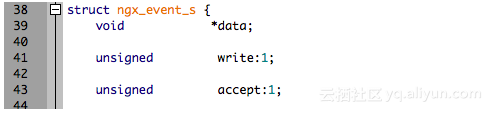
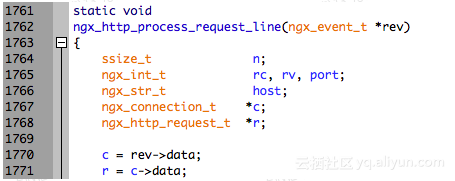
#cat get_c_fd.stp
probe process("/home/admin/tengine/bin/nginx").function("ngx_http_process_request_line").call {
    printf("c->fd: %d\n", @cast($rev->data, "ngx_connection_t")->fd)
}

#stap get_c_fd.stp
c->fd: 3
c->fd: 28
c->fd: 30
c->fd: 32
c->fd: 34
^C
7.10 定义某个类型的变量
同样是用 @cast,定义一个变量用来保存其转换后的地址即可,用法如下:
#cat get_c.stp
probe process("/home/admin/tengine/bin/nginx").function("ngx_http_process_request_line").call {
    c = &@cast($rev->data, "ngx_connection_t")
    printf("c->fd: %d, c->requests: %d\n", c->fd, c->requests)
}

#stap get_c.stp
c->fd: 3, c->requests: 1
c->fd: 28, c->requests: 1
c->fd: 30, c->requests: 1
^C
7.11 多级指针用法
root@j9 ~# cat cc_multi_pointer.c
#include <stdio.h>

struct test {
    int count;
};

int main(int argc, char *argv[])
{
    struct test t = {.count = 5566};
    struct test *pt = &t;
    struct test **ppt = &pt;

    printf("t.count: %d, pt->count: %d, ppt->count: %d\n", t.count, pt->count, (*ppt)->count);

    return 0;
}

root@j9 ~# gcc -Wall -g -o cc_multi_pointer ./cc_multi_pointer.c

root@j9 ~# cat cc_multi_pointer.stp
probe process("./cc_multi_pointer").statement("main@./cc_multi_pointer.c:13")
{
    printf("$t->count: %d, $pt->count: %d, $ppt->count: %d", $t->count, $pt->count, $ppt[0]->count);
}

root@j9 ~# ./cc_multi_pointer
t.count: 5566, pt->count: 5566, ppt->count: 5566

root@j9 ~# stap ./cc_multi_pointer.stp -c './cc_multi_pointer'
t.count: 5566, pt->count: 5566, ppt->count: 5566
$t->count: 5566, $pt->count: 5566, $ppt->count: 5566
简言之:通过[0]去解引用即可。
7.12 遍历 C 语言数组
下面是在 nginx 处理请求关闭时遍历请求头的例子:
#cat debug_http_header.stp
probe process("/home/admin/tengine/bin/nginx").function("ngx_http_finalize_request").call {
    i = 0
    headers_in_part = &$r->headers_in->headers->part
    headers = &@cast(headers_in_part->elts, "ngx_table_elt_t")[0]
    while (headers) {
        if (i >= headers_in_part->nelts) {
            if (!headers_in_part->next) {
                break
            }
            headers_in_part = headers_in_part->next;
            headers = &@cast(headers_in_part->elts, "ngx_table_elt_t")[0]
            i = 0
        }
        h = &@cast(headers, "ngx_table_elt_t")[i]
        printf("%s: %s\n", user_string_n(h->key->data, h->key->len), user_string_n(h->value->data, h->value->len))
        i += 1
    }
}

#stap debug_http_header.stp
User-Agent: curl/7.29.0
Host: 127.0.0.1:20090
Accept: */*
7.13 查看函数指针所指的函数名
获取一个地址所对应的符号: 用户态:usymname 内核态:symname
#cat get_c_handler.stp
probe process("/home/admin/tengine/bin/nginx").function("ngx_http_process_request_line").call {
    c = &@cast($rev->data, "ngx_connection_t")
    printf("c->read->handlers: %s, c->write->handler: %s\n", usymname(c->read->handler), usymname(c->write->handler))
}

#stap get_c_handler.stp
c->read->handlers: ngx_http_process_request_line, c->write->handler: ngx_http_empty_handler
^C

 Select Language